The Activity Estimations Matrix defines how much labor each activity requires per unit of space measurement. Combined with the Space Properties Matrix, it lets Mestamaster calculate expected task durations automatically across the whole project.
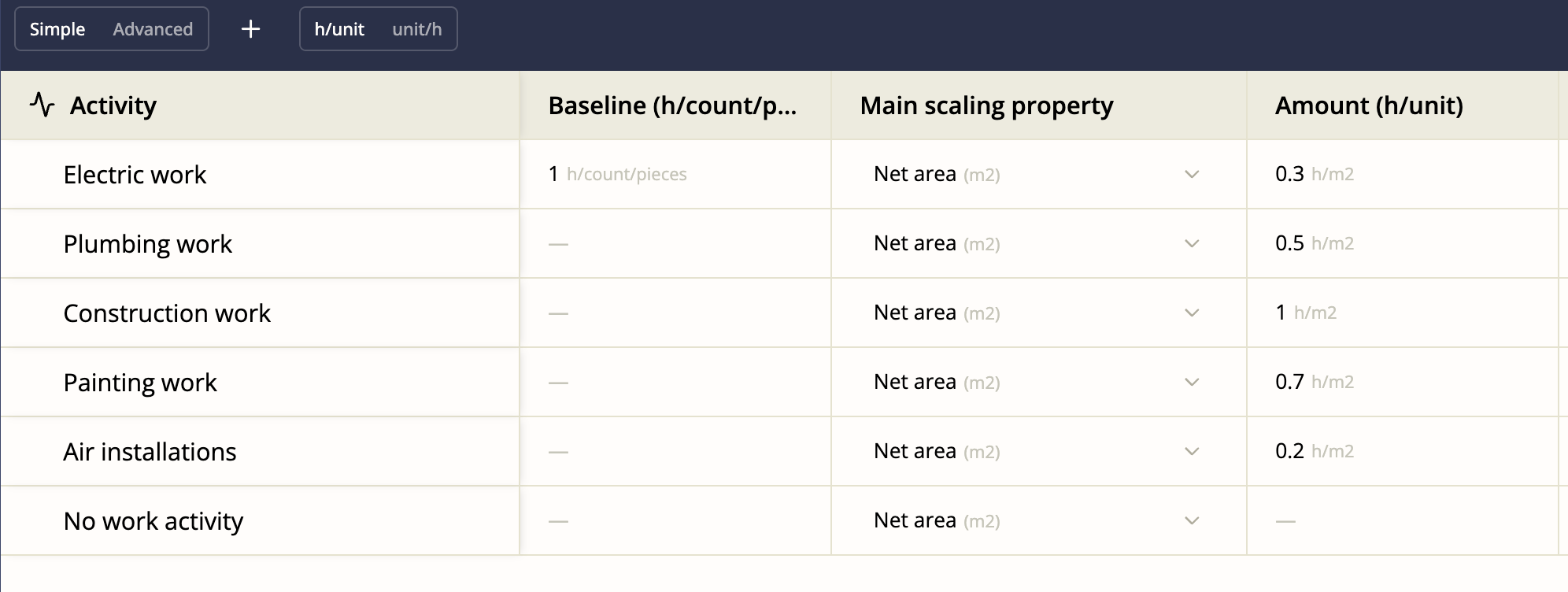
Getting there
Open a project → Activity Estimations (in the project sidebar)
The concept
The estimation system works in three steps:
- Space properties — you record measurements for each space (e.g. Floor 1 has 150 m² of net floor area)
- Activity estimations — you define how many hours per m² a given activity takes (e.g. Painting takes 0.5 h/m²)
- Calculated duration — the system multiplies them: 150 m² × 0.5 h/m² = 75 hours for Painting on Floor 1
This means you only need to estimate once per activity type, not once per space.
Two view modes
Toggle between Simple and Advanced using the button in the toolbar.
| View | Best for |
|---|---|
| Simple | Getting an overview, entering values quickly |
| Advanced | Working with multiple properties and complex estimation rules |
The baseline property
Every project has a Baseline property that cannot be deleted. It represents the fundamental unit of work — typically 1 (one task, regardless of size). All other properties are scaling factors on top of the baseline.
Adding a scaling property
Click Add property and select one of your Space Properties (e.g. net floor area in m²). This adds a new column to the matrix.
For each activity row, enter how many hours that activity takes per unit of that property.
Unit format toggle
Switch the unit format between:
- h/unit — hours per unit (e.g. 0.5 h/m²) — the more intuitive format for most users
- unit/h — units per hour (e.g. 2 m²/h) — preferred by some estimators who think in terms of productivity rates
Both represent the same underlying value; the toggle just flips how it’s displayed.
Tips
- Estimations are most useful on repetitive projects (apartment buildings, hotels, schools) where the same activity runs in many identical or similar spaces.
- Start with rough estimates and refine them after the first few units are complete — actual tracked data from completed tasks will tell you if your estimates are accurate.
- If an activity doesn’t scale with any space measurement (e.g. a one-time commissioning task), leave its estimation at the baseline value of 1.