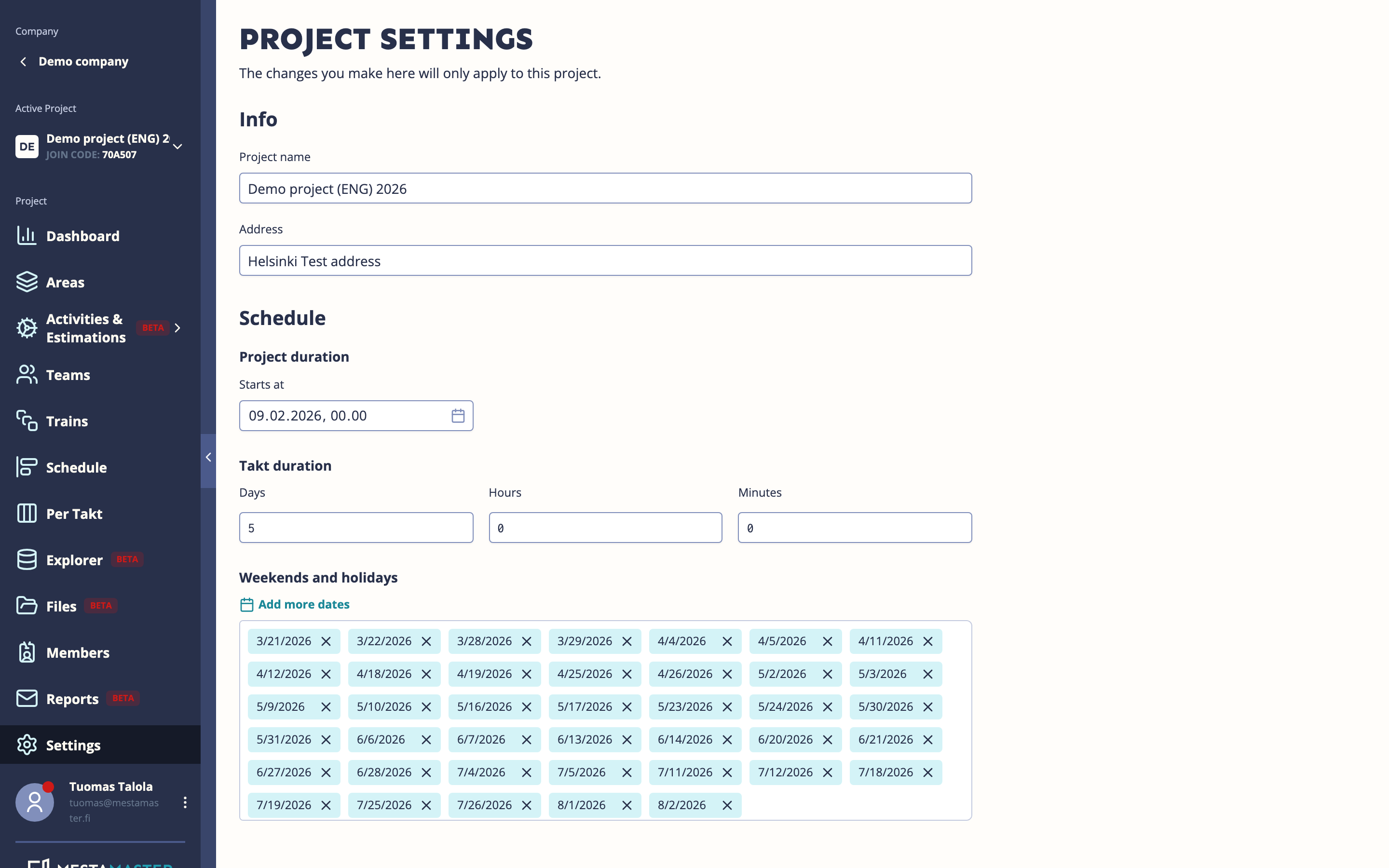
Project Settings contains the core configuration for your project — dates, takt duration, and which optional features are active. Most of these should be set when the project is created and rarely changed afterwards.
Getting there
Open a project → Settings
Info
| Field | Description |
|---|---|
| Project name | The display name shown across the app (minimum 2 characters) |
| Address | The physical address of the project site |
Schedule configuration
| Field | Description |
|---|---|
| Start date | When the project begins — the first takt starts on this date |
| End date | When the project is planned to finish |
| Takt duration | How long each takt is: week (5 days), half week (2,5 days), or daily |
| Weekends | Select which days are work-free (excluded from scheduling calculations) |
| Holidays | Add specific dates that are excluded from the schedule (public holidays, site shutdowns) |
The takt duration is the most important setting in this section — it determines the rhythm of the entire project. Set it before building your schedule and avoid changing it mid-project.
Tips
- Set the start date, end date, and takt duration before creating any templates or schedule — changing the takt duration after trains have been placed requires re-planning the whole schedule.
- Add public holidays for your country at the start — they affect how task due dates are calculated.
- Enable the estimations module only if you plan to use it — it adds two sections to the navigation that may confuse users who don’t need them.